
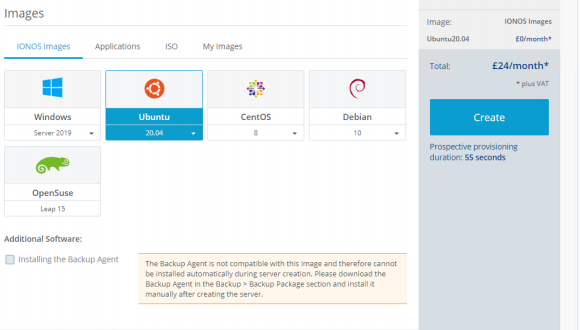
Get your server onto the Ubuntu 20.04 OS:
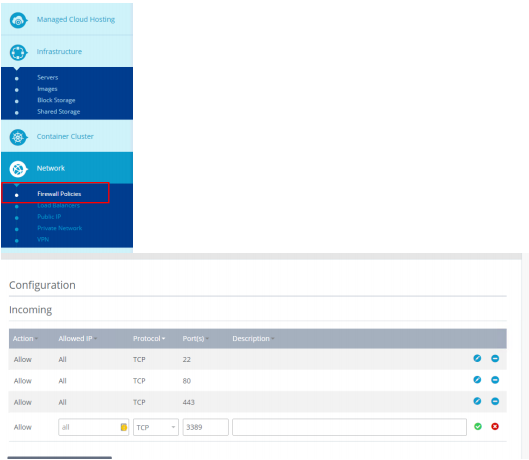
Open port 3389 on the firewall:
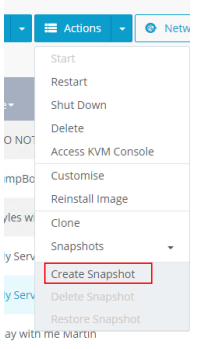
Create a snapshot in case anything goes wrong (if the server is not a dedi):
Connect to the server with SSH, Install Gnome:
apt-get update
apt-get install ubuntu-gnome-desktop
When it asks for y or n press y and enter
Allow this to install, the use command reboot to reboot the server:
reboot
Leave this a few moments to reboot then reconnect to the server and run the following commands:
apt-get install xrdp
When it asks for y or n press y and enter
You can not use root in the desktop so create a new user:
adduser yourusername
Fill in the new users data
Run:
echo "gnome-session --session=gnome-flashback-metacity & gnome-panel" >~/.xsession
Install wine, this will allow you to run some windows apps:
sudo apt install wine64 wine32
When it asks for y or n press y and enter
Now connect on RDP and run through the set up, it may want you to apply some updates, it may ask for an Administrator password, this would be the root one